

Automatic time tracker software Never start
a timerever again.
TimeUno is a time tracker that records your work from the
first minute, sorts every hour into projects and shows when
you were productive, distracted or working with AI.
Also on Windows · Linux (beta)
Card required. You’re only charged when the trial ends.
Sound familiar?
Time tracking fails when you have to remember it.
Timer apps only count the hours you remember to start. The rest is lost, guessed or rebuilt on Friday.
-
You forgot the timer. Again.
TimeUno runs from the moment you start working. Nothing to start, stop or forget, so no hour goes missing.
-
Friday afternoon, rebuilding the week from memory.
TimeUno builds your timesheet from the time already tracked per project. Check it, adjust a line, export it as CSV.
-
Billing clients by gut feeling.
Every app, site and editor project lands in the right project, so you bill the hours you actually worked.
-
Your AI agents work, but their time is invisible.
Claude Code, Cursor and other AI tools get their own timeline: when they worked, when they waited and what it cost.
Automatic classification
Time tracking
that understands.
TimeUno understands what you’re doing
and classifies your time with AI.
The difference
A timer app vs. TimeUno
| What happens | Timer app | TimeUno |
|---|---|---|
| Starting the clock | You, every time you switch tasks | Nobody. It runs by itself |
| A forgotten hour | Lost | Recorded |
| The weekly timesheet | Rebuilt from memory | Built from tracked time, ready as CSV |
| Which project | Picked by hand | Detected from your editor project or your keywords |
| Distractions | Invisible | Every hour marked productive or unproductive |
| AI tool time | Not tracked | Its own timeline, with tokens and cost |
See it in action
See TimeUno in under two minutes.
The desktop app, the server agent and the browser extension at work, then automatic classification, projects, timesheets and how your data stays yours.
How it works
Set up the time tracker once. Then forget it.
-
Install TimeUno
The desktop app for macOS, Windows or Linux, plus the browser extension if you want sites too. It takes about a minute.
-
Work like you always do
TimeUno records the app in front, the project you’re in and your AI tools in the background. No buttons, no tags.
-
Read your day
Hours by project, productive and distracted time, AI time. Correct a label once and TimeUno remembers it.

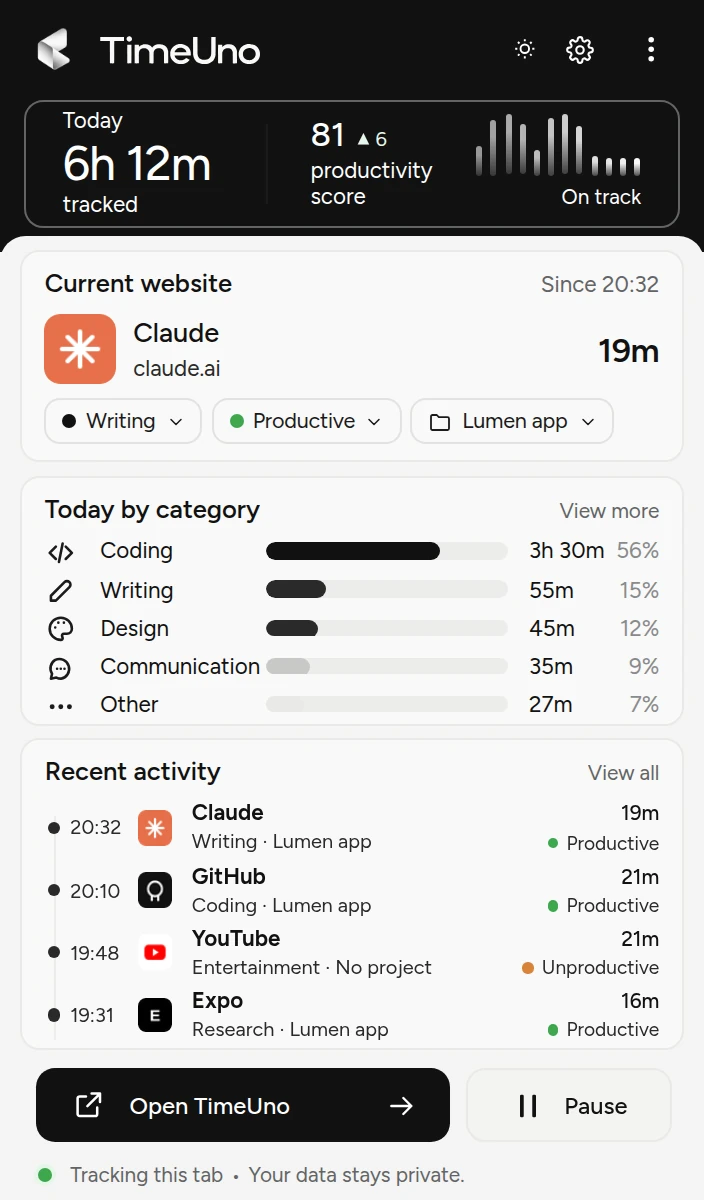
Desktop + browser
One time tracker.
Every app you use.
TimeUno runs in the background on your computer
and in your browser, giving you a unified view of
your time across all tools, apps, and websites.
Who it’s for
For people who bill, build or just want their time back.
-
Freelancers and agencies
Bill every hour you worked, per client and project, without a timer running in the corner.
Time tracking for freelancers -
Developers working with AI
Your time and your agents’ time side by side, per project. See what Claude Code and Cursor really cost you.
Project time tracking -
Teams
Admins see worked time, a productivity score and AI usage per person. Never anyone’s apps, sites or screenshots.
Employee time tracker for teams
Privacy by design
Your activity
belongs to you.
We believe time data is personal. You should always
know what’s being tracked, how it’s used, and have
full control over your data.
-
Transparent tracking
See exactly what’s being tracked
and how it’s classified. -
You control it
Pause any time, correct how anything
is classified, and it remembers. -
Metadata, not content
TimeUno sends your coding agents' metadata
only. Your prompts never leave your device. -
Your data, your choice
Your data is never sold. Ask and we
delete your account and data
the same day.
Time tracking app questions
How does automatic time tracking work?
TimeUno is a work time tracker that runs in the background and records the app or site in front, the window title, idle time and the project you’re in. It never records what you type. From that it builds your timeline and sorts every stretch into a project and a category.
Do I still need to start a timer?
No. That’s the point. TimeUno tracks while you work and marks the time you’re away as idle. There is no timer to start, stop or forget.
Can I export timesheets?
Yes. Timesheets are built from the time tracked per project for this week, last week or this month, with a client name. Edit any line, then export as CSV. If you track by hand, use the free timesheet templates.
Which computers does it run on?
The desktop app runs on macOS, Windows and Linux, and the browser extension adds the sites you visit. There is no mobile app: TimeUno tracks the work you do on your computer.
What does TimeUno see, and who else sees it?
Screenshots and on-screen text are on by default and you can turn them off per computer. From AI tools it sends metadata only; prompts, answers and code never leave your device. In a team, admins see worked time and scores, never your apps or sites. Our servers are at Hetzner in Germany, and your data is never sold.
Is TimeUno a legal time clock?
No. TimeUno is not a certified time clock for legally required working-time records. It shows where your time goes and turns it into timesheets.
Is there a free plan?
No, but every plan starts with a 14-day trial, so you see a full week of your own time before you pay.
Know where your week went.
Install TimeUno today. By the end of the week you’ll have a summary like this one, built from your own work.
Start your 14-day free trialCard required. You’re only charged when the trial ends.