

Project time tracker Hours per project, filed while you work.
TimeUno sees which project you are working on and puts the time under it, with no timer to start. Each week you see the hours per project, split between you and your AI tools, and you can turn any project into a timesheet.
Start your 14-day trial 14-day trial, then $14.99 a month
What a project time tracker does
A project time tracker records how many hours go into each project, so you can bill clients, check estimates and see where the week went. Most trackers need you to pick a project and start a timer. TimeUno picks the project from what you are working on and records the time on its own.
How TimeUno files time under projects
Projects come from two places: your work and your own list. The first time TimeUno sees a new project, it asks before it tracks it.
- From your editor. In an editor or an AI coding tool, TimeUno reads the project name from package.json, Cargo.toml, go.mod or pyproject.toml, or else the folder name. The desktop widget asks Track X as a project? Choose Add or Don’t add.
- By hand. On the Projects page, click New project, give it a name and add keywords, such as a client name, that help TimeUno file time under it.
- Corrections. Move any activity to another project from the Timeline. Time without a project waits under Review unassigned time.
What you see per project
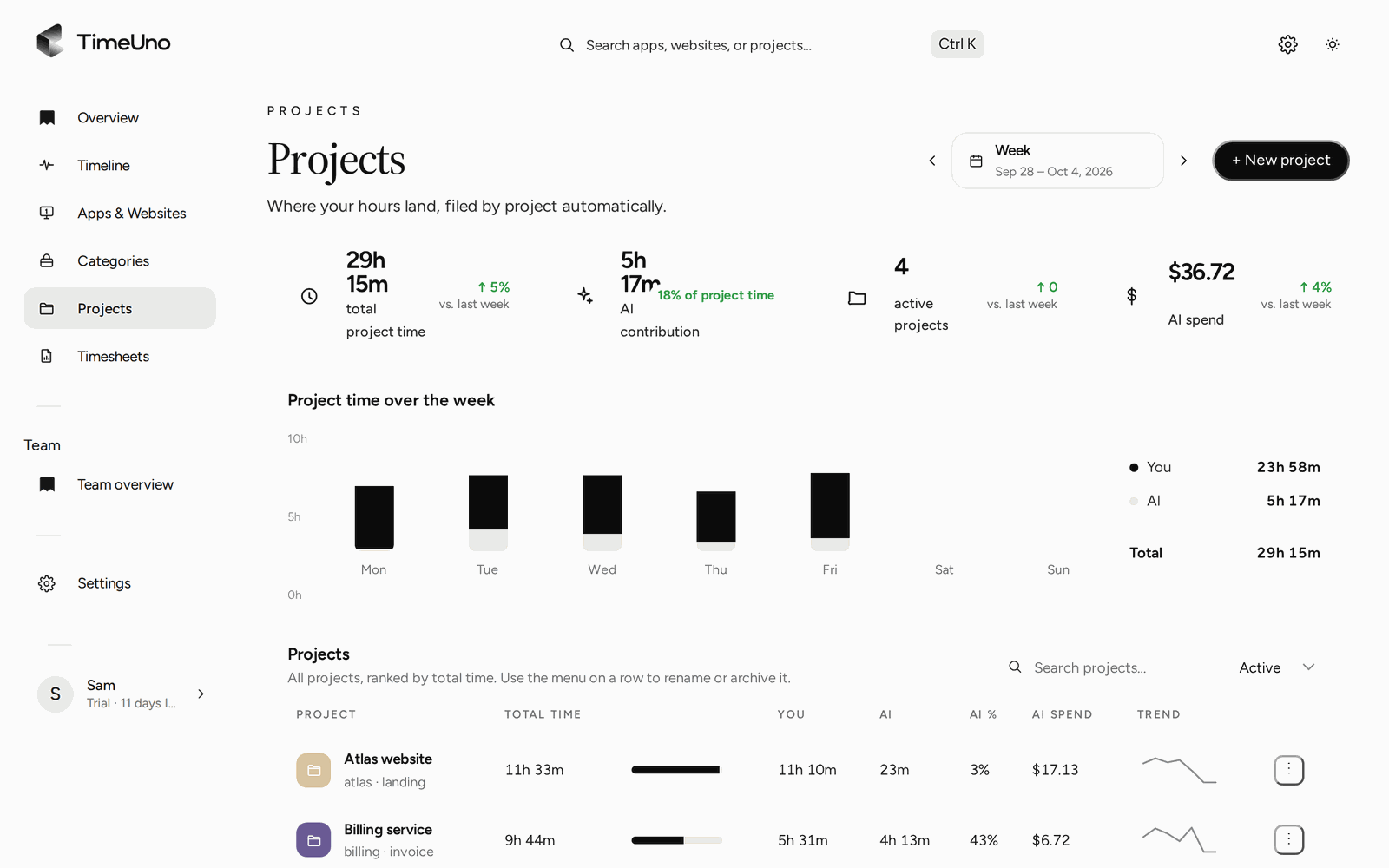
The Projects page shows one week at a time, and the arrows step back to earlier weeks. For each project you see:
| Column | What it shows |
|---|---|
| Your time | Hours you spent on it |
| AI time | Hours your AI tools worked on it |
| AI share | The part of the work done by AI |
| AI spend | What the AI tools cost for it |
| Trend | More or less than before |
Above the table, a stats row gives total project time, AI contribution, active projects and AI spend for the week, and a chart splits each day between you and AI.
Project time tracking for developers and AI work
If you write code with Claude Code, Cursor, Codex CLI or similar tools, a timer only sees half the work. TimeUno tracks the agent while it runs, even in a background terminal, and files that time under the same project as yours. You see what a feature cost in your hours and in AI time and spend.
From project hours to a timesheet
When the week is done, open Timesheets, choose the project and the period (this week, last week or this month) and add a client name. TimeUno writes a line per day from the tracked time. Edit the descriptions, leave out lines you don’t bill and download it as CSV. See automatic timesheets for the details.
Where it does not fit
TimeUno tracks work on a computer. If your project hours happen on site, on the phone or away from a desk, use a timer app or a project timesheet template for those hours. TimeUno has no mobile app and does not sync worklogs into Jira, Asana or other project tools.
Updated 13 October 2026
Questions people ask
How does TimeUno know which project I am working on?
In an editor or AI coding tool, it reads the project name from package.json, Cargo.toml, go.mod or pyproject.toml, or uses the folder name. It never reads the files themselves. For other work, add a project by hand with keywords.
What happens to time that has no project?
It shows up under Review unassigned time. You can move any activity to a project from the Timeline.
Does it sync with Jira, Asana or Trello?
No. TimeUno sees the time you spend in those tools, in the browser or the desktop app, but it does not write worklogs back to them.
Can I bill clients from it?
TimeUno builds a timesheet per project with an optional client name and exports it as CSV. It does not send invoices: use the CSV in your own invoicing tool.