

Bill AI agent work Turn agent sessions into a line on the invoice.
TimeUno tracks your own time and your AI tools' time on the same project, so the hours Claude Code, Cursor or Codex spend on a client's repo show up next to yours, not off the books.
Start your 14-day free trial 14-day trial, then $14.99 a month
Why agent work slips off invoices
You open a terminal, point Claude Code or Cursor at a client’s repo, and come back later to a finished feature. That hour did not feel like work, so it is easy to leave off the invoice, even though you reviewed every diff and reran the agent twice to get there. TimeUno tracks that hour next to your own, so it shows up on the timesheet instead of disappearing.
How TimeUno counts agent time per project
The desktop app and the headless agent watch each Claude Code, Cursor or Codex session and record when it is working, waiting on you or done. That time is filed under the same project as your own hours, so a client’s repo gets one place where your time and the agent’s time both land, each on its own row.
Hourly vs per-outcome pricing
Two ways to turn that into a rate. Bill hourly on your own supervised time and treat the agent like a compiler, a tool that speeds up work you are still doing. A two-hour feature where you spent forty minutes reviewing and steering three agent runs bills as forty minutes, same as before agents.
Or price the outcome. Quote a fixed price for the feature or the fix, run as many agent attempts as it takes, and use the per-project split of your time and the agent’s time afterward to see whether that price covered the work. If an agent-heavy feature keeps coming in under your estimate, you have the project history to adjust the next quote. If you bill one client at a time, a freelancer’s billable hours turn into a per-client timesheet the same way.
What an invoice line looks like
TimeUno does not send invoices. It builds the numbers, and you put them into whatever you already invoice with. A line for a week of work on a client’s repo might read “Checkout flow refactor, 6.5 hrs, Aug 12 to Aug 16,” where the 6.5 hours are your own tracked and reviewed time. If you need to add a block of hours by hand first, the timesheet calculator does the math without needing a TimeUno account.
The client report
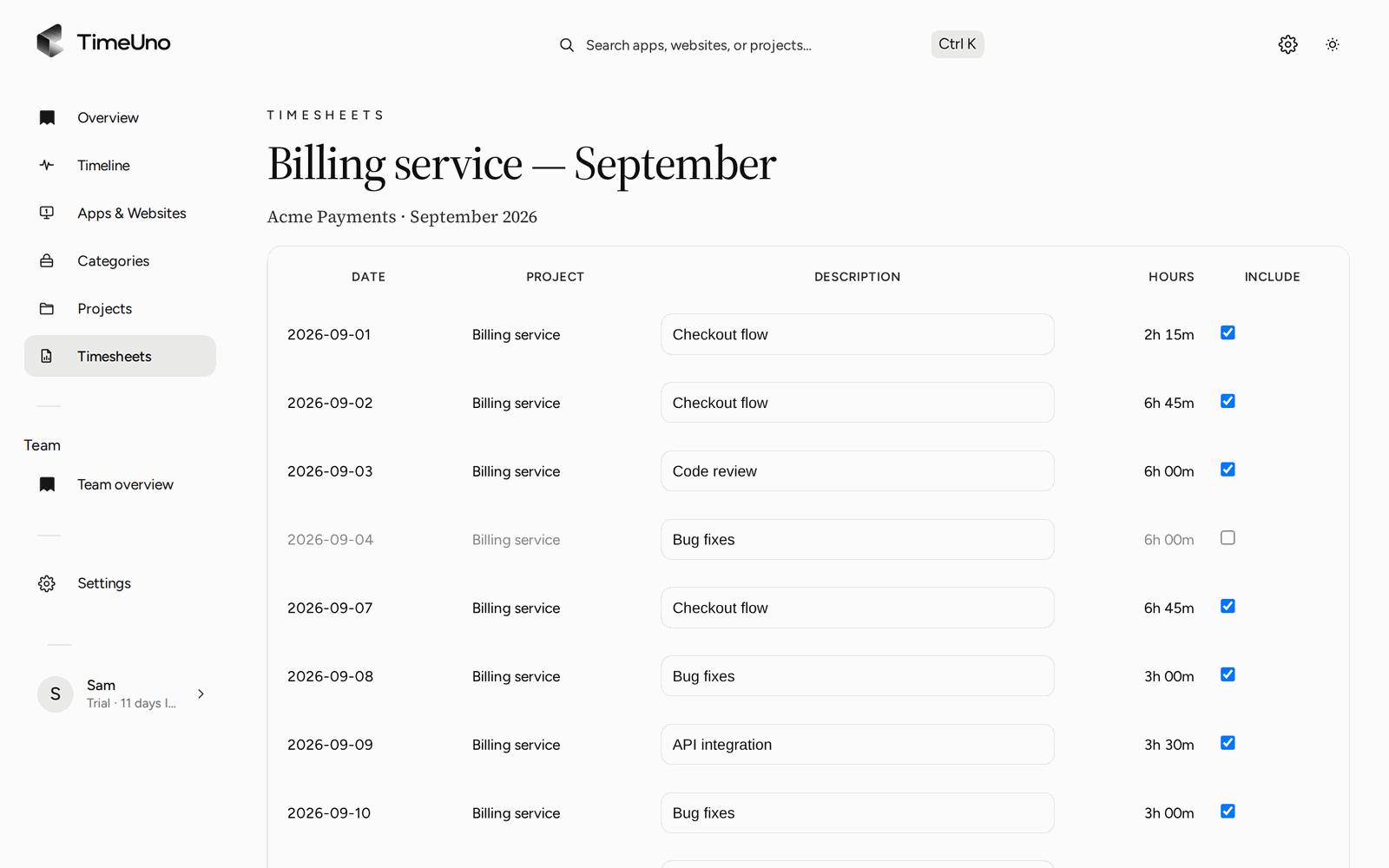
At the end of a billing period, build a timesheet for the project and export it as CSV: Date, Project, Hours, Description and a Total row. The export is your own hours, the ones you bill for. The preview above it, and the Projects page, show the AI tools’ time on the same project beside yours, so you can decide how to price a feature before you export anything, but that AI time is not a column in the file you hand to your client.
From a working folder to a client’s timesheet
When you run Claude Code, Cursor or another AI tool in a project folder, on your laptop or on a server over SSH, TimeUno matches that folder to one of your projects. New projects are detected on their own from a package.json, Cargo.toml, go.mod or pyproject.toml file, or from the folder name, and you can add one by hand and match it by keyword. Add the client’s name as text on the project’s timesheet, and every session in that folder, yours and the agent’s, lands on that client’s hours without you filing anything by hand.
Updated 18 October 2026
Questions people ask
Does TimeUno send invoices to my clients?
No. TimeUno tracks your hours and your AI tools' hours per project and exports a timesheet CSV: Date, Project, Hours, Description and a Total row. You add that to whatever invoicing tool you already use.
How does TimeUno know which client a Claude Code session belongs to?
It reads the session's working folder and matches it to one of your projects, the same project your own time in that folder lands under. Projects are detected on their own from a package.json, Cargo.toml, go.mod or pyproject.toml file, or you add one by hand and put the client's name on its timesheet.
Does the CSV export include my AI agents' hours?
No. The export is your own tracked hours only: Date, Project, Hours, Description, Total. The timesheet preview and the Projects page show AI time next to yours so you can see it while you price the work, but it is not a column in the file.
Should I bill agent time hourly or charge a fixed price?
Either. Bill hourly on the time you spent supervising and reviewing, with the agent treated as a tool rather than a separate line. Or quote a fixed price for the outcome and use the per-project split between your time and the agent's time afterward to check whether that price held up.
What does Team cost if more than one person bills the same clients?
Team is $19.99 per seat a month, or $13.99 a month billed yearly. Each person gets their own tracked time and timesheets, with one shared view of every project across the team.