

Screen time tracker See your computer screen time, app by app.
TimeUno tracks screen time on your computer: which apps and websites you used, for how long, and whether it was work. It runs on macOS, Windows and Linux. It does not track your phone.
Start your 14-day trial 14-day trial, then $14.99 a month
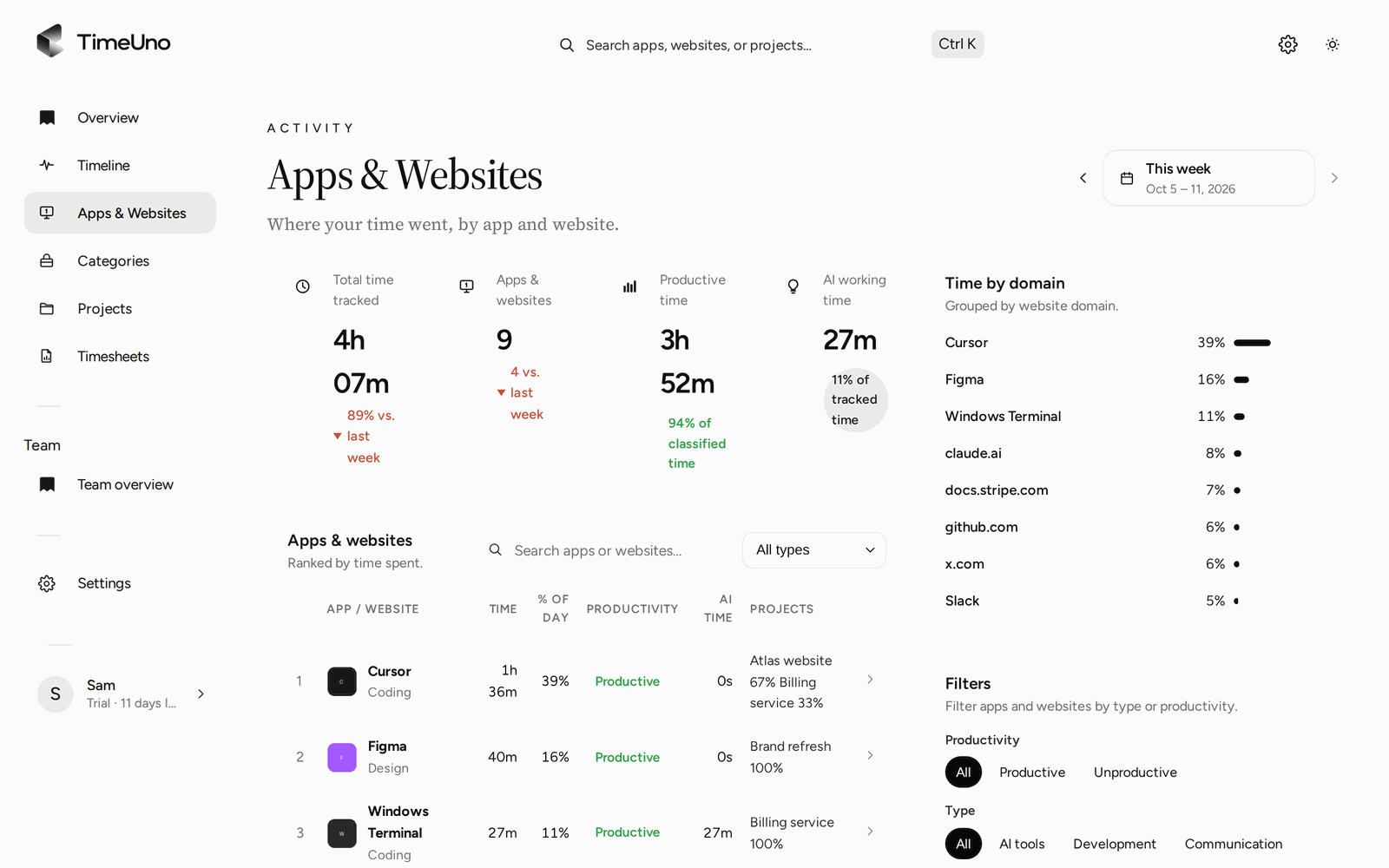
A screen time tracker for your computer, not your phone
A screen time tracker shows how long you spend on each app and website. Phones have one built in. Computers mostly don’t, or only show raw totals. TimeUno is a screen time tracker for desktop: it runs on macOS, Windows and Linux and records the app in front of you, its window title and when you were idle.
TimeUno has no phone app. If you want to cut phone time, use the screen time settings your phone already has.
What it records
The desktop app records the app in front of you, its window title and idle time. Add the browser extension and it also records the site you are on, so your browser stops showing up as one long block of “Chrome”.
| Source | What you see |
|---|---|
| Desktop app | Time per app, window titles, idle time |
| Browser extension | Time per site and page |
| AI tools | When Claude Code, Cursor and others work, wait or finish |
It counts the seconds with keyboard or mouse input, never what you typed or where you clicked. Time with no input is marked idle and kept apart.
Screen time by app and website
The Apps & Websites page ranks every app and site by time for the day, week or month. Filter by productive or unproductive, or by type: AI tools, development, communication, design, entertainment. Each row shows the time and the projects it went to.
The Categories page groups the same time into categories like coding, meetings, email and social, next to last week.
Screen time that knows what was work
Raw screen time treats an hour in YouTube the same, whether it was a tutorial or a cat video. TimeUno marks each stretch productive or unproductive, using the site and window title. You get a productivity score from 0 to 100 for the day.
If it gets one wrong, correct it once. Repeated corrections become rules, such as youtube.com counting as productive.
Compared with built-in screen time
macOS Screen Time and phone screen time features count minutes per app. TimeUno adds the parts they lack for work: a productive or unproductive verdict you can correct, projects and timesheets.
| macOS Screen Time | TimeUno | |
|---|---|---|
| Time per app and site | Yes | Yes |
| Productive or not | No | Yes, and you can correct it |
| Time per project | No | Yes |
| Windows and Linux | No | Yes |
| Phone | Yes (iPhone) | No |
| Price | Included with macOS | $14.99 a month after a 14-day trial |
Pause it when you want
Pause tracking for 15 minutes, 30 minutes, an hour or until you resume, from the desktop widget, the tray menu or the dashboard. A paused computer records nothing and sends nothing. Screenshots and on-screen text reading are on by default and can be switched off per computer under Privacy.
Updated 13 October 2026
Questions people ask
Does TimeUno track screen time on my phone?
No. TimeUno has no mobile app. For your phone, use Screen Time on iPhone or Digital Wellbeing on Android. TimeUno covers your Mac, Windows or Linux computer.
Does my Mac or Windows PC have screen time built in?
macOS has Screen Time in System Settings, which shows time per app and website. On Windows, per-app screen time comes through Microsoft Family Safety, which is built for family accounts. Neither tells you which time was work, or files it under projects.
Does it take screenshots?
By default, the desktop app takes a screenshot of the window you are using about once a minute and reads the text on screen, to see what you are working on. You can turn both off per computer. Screenshots are never shown in the dashboard.
Can I use it to watch my kids or employees?
No. TimeUno is for tracking your own time. On a Team plan, admins see worked time, productivity score and AI usage per person, never apps, sites, window titles or screenshots.